VPN providers advertise anonymous browsing and have become part of the mainstream. But what exactly is a VPN, and what is it used for? What are the benefits of VPN access in a company network? In this blog post, we take a closer look at the term and explore practical use cases. We also explain how you, as a private user or sysadmin, can easily set up your own VPN server with the WireGuard one-click app in the Hetzner Cloud.
VPN basics: what a virtual private network really does
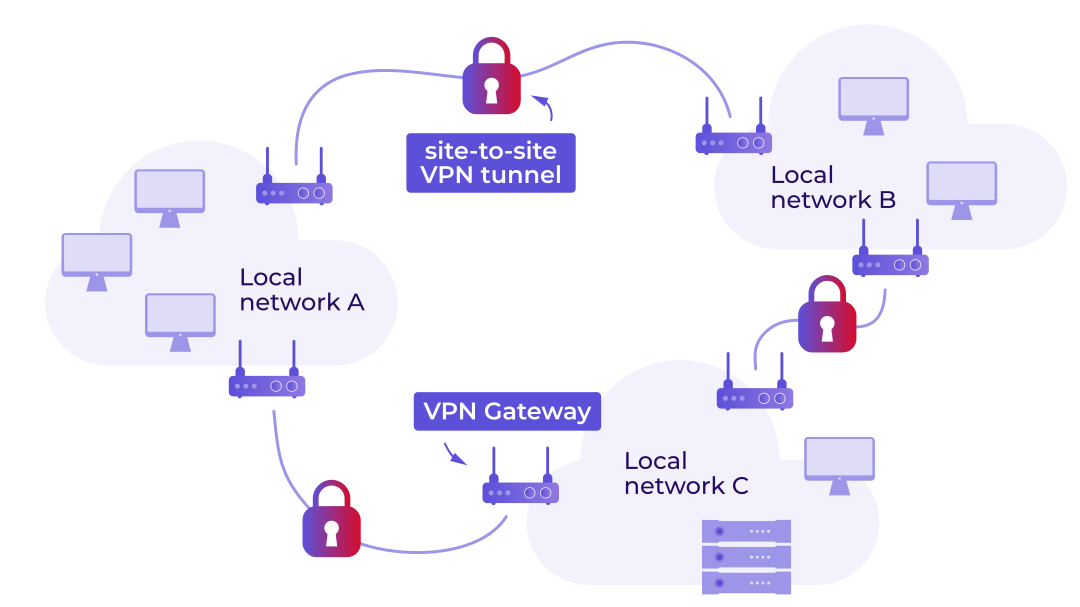
The Virtual Private Network (VPN) originally emerged from a clear need: Companies wanted to connect their corporate networks across different locations via the public internet without having to install expensive leased lines. This allows multiple local area networks (LANs) to communicate with each other as if they were in the same place. The connections between endpoints run through what is known as a “VPN tunnel”, creating a “site-to-site VPN.” To prevent third parties from intercepting the data, all data traffic is encrypted. Security is a fundamental part of any VPN.
Private users can also benefit from this principle, for example by using a smartphone to access their home network. With a configured VPN tunnel, you can easily access files on your own PC, use your home printer, or control smart home devices — provided the devices at home are switched on.
The limits of consumer VPN services
Today, private users mainly use VPNs to browse the internet anonymously and securely — and to leave almost no digital footprint. This is especially important on public Wi-Fi networks, such as in cafés or at airports. After all, who can be sure that the router there is configured correctly and that data is not being tracked or, in the worst case, even leaked? Thanks to VPN technology, websites and other services only see the IP address of the VPN server, not your actual location. Your traffic also remains hidden.
There are now countless VPN providers online advertising secure connections, anonymity, and “location switching with one click.” For private users who simply want to browse without interruption or conceal their location, this can certainly make sense. However, a third-party provider is technically always positioned between you and the internet. In case of doubt, that provider therefore has control over your data, even if it claims otherwise. Traditional consumer VPNs reach their limits as soon as multiple locations, internal systems, or sensitive data are involved.
Even with an active VPN tunnel, you should still be careful when browsing the internet. Tracking services continue to use methods such as browser fingerprinting. User-specific characteristics such as screen size, installed fonts, or language settings are analyzed to identify users. So even when using a VPN tunnel, pay attention to what information you disclose online.
So what can you actually use VPNs for? The basic idea of connecting different networks with encryption opens up a range of interesting use cases.
VPN in companies: secure remote work, site-to-site connections, and external access
While a VPN primarily offers convenience and privacy for private users, in a business context it is an essential tool for security and access control.
This technology is especially worthwhile for smaller companies with multiple locations, where expensive MPLS (Multiprotocol Label Switching) and dedicated Ethernet lines usually do not pay off. But that is far from the only use case.
In most companies, remote work without a VPN is hard to imagine. Employees need secure access to internal resources from anywhere, whether they are working with web applications or databases. With a VPN, access runs through an encrypted tunnel into the company network, without exposing services directly to the public internet. This is known as a “client-to-site VPN.”
External service providers also sometimes need access to the company network. The VPN provides secure access and defines which files the relevant person is allowed to access. For example, while the tax advisor may only be allowed to view folders from accounting, IT support may be granted access to specific relevant servers. You can track activities and revoke access at any time.
SSH, IoT and critical access points: How to protect your infrastructure
In addition to the classic use cases, data security and the security of connected devices are also central issues. Take IoT, for example: companies sometimes use devices that are connected to the internet and must never be freely accessible. These may include surveillance cameras, sensor systems, or smart home components. A VPN server adds the necessary and important security layer: these systems should only be accessed through the VPN tunnel. The principle is simple: potential attackers can no longer see the devices on the internet. And what they cannot see, they cannot attack.
Developers are familiar with this problem as well. Risk-free testing is crucial in development environments. These environments often contain sensitive data and unfinished software with potential security vulnerabilities. The goal of the VPN is to shield these critical systems from the public internet and grant access only to authorized developers. The attack surface shrinks dramatically, firewall rules become simpler, and accidentally public test instances become a thing of the past.
Security tip for sysadmins and other professionals
Secure your management interfaces with a VPN. SSH access and administration interfaces for your servers are among the most sensitive areas. You can completely separate critical administration access from the internet. Configure your firewall so that SSH ports and web interfaces for sensitive systems are only reachable via the VPN. This makes brute-force attacks and automated scans ineffective — attackers simply cannot see these services. This method offers significantly more security than IP filtering or port knocking. Even if attackers know the IP address of your server, they cannot connect to the protected services without a valid configuration.
Speaking of protection: secure data transmission in companies is not just a nice-to-have; in many cases, it is also mandatory. Frameworks and regulations such as
- ISO 27001,
- BSI IT-Grundschutz (the German Federal Office for Information Security’s “IT baseline protection“),
- C5 (Cloud Computing Compliance Criteria Catalogue),
- and the GDPR (the EU’s General Data Protection Regulation).
require sensitive and personal data to be transmitted only over protected connections. A VPN fulfills these requirements by encrypting data traffic and protecting it from eavesdroppers and manipulation. Companies that meet the criteria of a compliant information security management system (ISMS) can receive ISO 27001 certification and, in addition, a C5 attestation. Hetzner has been certified for all hosting services and data centers. You can find more information here.
Self-hosting a VPN server: is it worth it?
If you want more than a basic way to hide your IP address, there is hardly any way around a self-hosted VPN server. The best way to implement all of the use cases above is with your own VPN server. The server is also ideal for accessing your home network. For sysadmins and companies, third-party providers are not an option, because only your own VPN server allows you to build real infrastructure.
Costs remain low and mainly depend on where you host your server and how much traffic you generate. While consumer VPN services work with device limits or pricing tiers, your own server remains financially straightforward. You decide how much performance you actually need. There are no artificial restrictions and no unexpected surcharges. You only pay for the server instance. The VPN software is free if you choose an open-source option.
And do not worry: setting up a VPN server is easier than you might think. There are now many one-click apps that set up your server in a very short time. You can choose from various VPN protocols. We recommend the open-source WireGuard protocol. It is very easy to use and relies on state-of-the-art cryptography, so your data is securely encrypted. Other notable protocols include IPsec/IKEv2 and OpenVPN.

WireGuard on Hetzner Cloud: a simple way to run your own VPN
Which server makes the most sense for a VPN? There are many different server types, hardware components, and plans — and it is easy to feel overwhelmed with options.
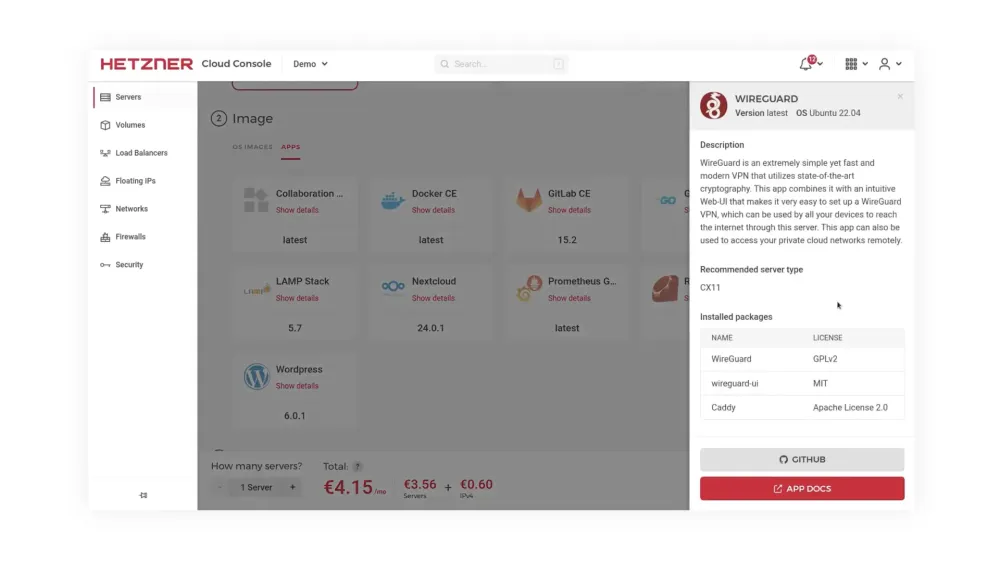
Because the server “only” provides you with a VPN tunnel, you do not need much computing power. Hetzner cloud servers are ideal for this, and WireGuard is available as an app for all cloud servers. This is perfect for getting started because you do not need to set up a server with your own operating system installation. You can select the software in the “Image” category under “Apps.” After setting up the server, installing the app takes only a few minutes, and managing it afterwards is clear and easy.
Choosing the right cloud plan depends heavily on your individual use case. For beginners and smaller companies, we recommend the “Cost Optimized” or “Regular Performance” plans. For around 30 simultaneous VPN users, the Cost Optimized plan with sufficient RAM is completely adequate. A concrete example would be the CX33 with 4 vCPUs and 8 GB RAM. We also recommend activating both IPv4 and IPv6 to ensure maximum compatibility with all end devices and networks.
You can find step-by-step instructions for setting up a cloud server with WireGuard in our docs.


Getting started made easy
The simple cloud: Maximum user-friendliness, minimum price, ready to go in seconds.
Simple VPN access for teams, devices, and external users
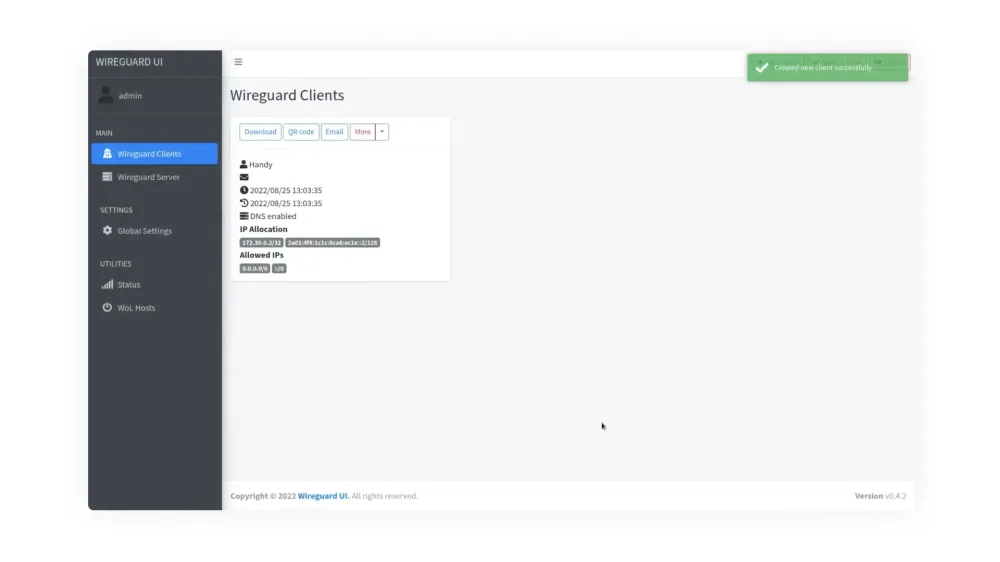
After installing WireGuard, you will use its intuitive web interface to manage your VPN server. You as the sysadmin can conveniently log in through the browser and manage all necessary information, such as the server settings. The dashboard provides a compact overview of all relevant data: active connections, transferred data volumes, and assigned IP addresses. For example, you can create separate configurations for full access to the company network, restricted profiles for external service providers, or pure internet tunnels for secure browsing on public Wi-Fi.
We particularly like how easy it is to create clients, which takes only a few clicks. In a company environment, this simplification saves a lot of time and effort: instead of guiding every team member through complex instructions, you simply send the configuration file or QR code to your teammates, and they can quickly access the VPN. The WireGuard app on mobile devices is especially practical and straightforward when you’re connecting remotely: scan the QR code, and you are done.
You can also define shell scripts that should run before or after the VPN server starts. This can be useful, for example, for setting up specific firewall rules or NAT (Network Address Translation). These settings then apply globally to the entire WireGuard server instance and therefore affect all connections/peers equally. Comparable scripts as part of the individual client configuration are not intended.
Self-hosted VPN or VPN provider: control or convenience?
Ultimately, your use case will determine whether you will benefit from having your own VPN server or whether it would be enough to use a traditional third-party VPN service.
If you want to anonymize your identity on the internet, VPN service providers can certainly make sense. However, as soon as you want secure access to your home network while on the go, need to connect multiple locations, or want full control over your data, there is no way around your own VPN server.
For sysadmins in particular, setting up a VPN environment is part of the basic toolkit. And the good news: it has never been as easy as it is today. Thanks to modern one-click apps, such as the WireGuard app, and quickly available cloud servers, you can build and then manage a stable and secure VPN infrastructure in just a few minutes.


Sovereignty starts with hosting it yourself
Minimize risks. Control costs. Maximize data protection. Get started with self-hosting and Hetzner.