


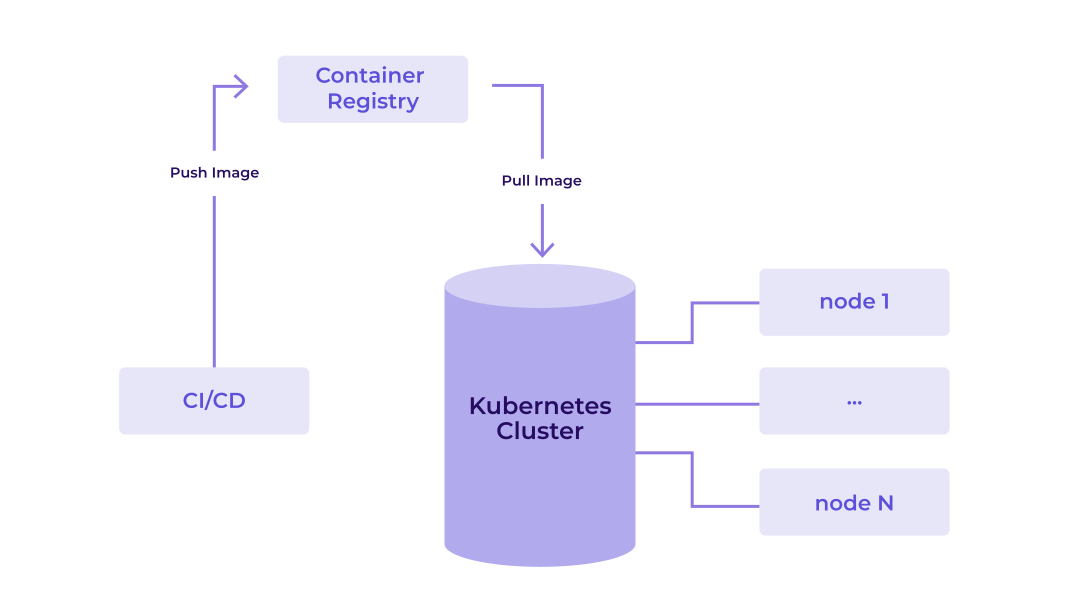
Containers are a very broadly used method of abstracting and isolating the operation of software components. Modern cloud infrastructure especially relies heavily on containerization, for example, by distributing containerized workloads with Kubernetes. You can use a container registry as a central storage solution so you can distribute container images that you build locally or in CI/CD environments across many systems.
In the following sections, we explore how far a single Hetzner Cloud Server can take a self-hosted registry and the performance you can expect from it.
Building a registry
Before you test a registry, you need to build it. There are open-source implementations available for storing images in accordance with the OCI Image Format Specification and distributing them via the OCI Distribution Specification. For example, you can use the software Harbor. Installing Harbor on a Hetzner Cloud Server like the CPX42 is straightforward with a Debian operating system and following its installation guide.
For further testing, we set up Harbor 2.15.1 on a CPX42 (8 vCPUs; 16 GB RAM) and Debian 13 and used a Hetzner Cloud Volume with 500 GB for storing the images. We disabled optional features in Harbor, like vulnerability scanning, for the tests. We will consider testing other server types later on.
Test strategy
As there are many ways to test software components, it was important to define the goals of the tests beforehand. Our goal was to have a simple and fast way to determine the performance of pushing and pulling container images to the registry with different hardware and software configurations.
To achieve that, we wanted to:
- collect statistics about the compute resource usage (like CPU, RAM),
- collect statistics about the push and pull performance (like duration, throughput),
- have test execution times on the order of minutes and
- have a simple test setup that does not require a lot of infrastructure.
Our overall test strategy was to have a single tool orchestrating 2 major components: first, a load generator that put stress on the registry via its distribution API, and second, a statistics collector that collected compute statistics from the Hetzner Cloud Server running the registry.
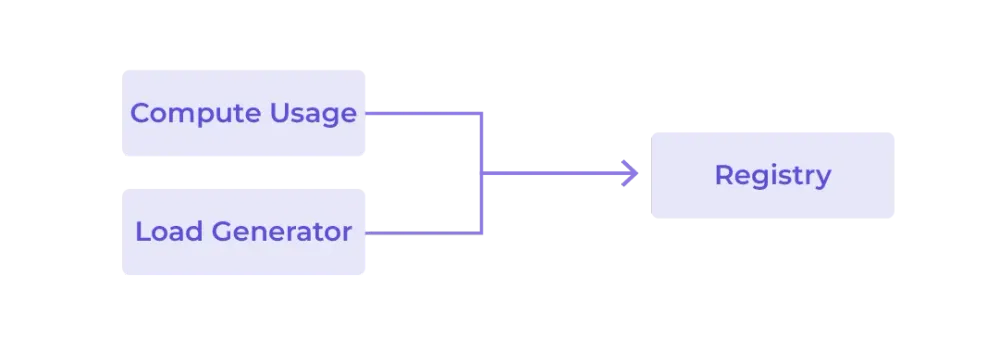
While the setup was pretty simple and delivered results fast, neither the load generation nor the registry itself was spread across multiple hosts. Performance fluctuations from neighboring Hetzner Cloud Servers could therefore skew the test results slightly.
Furthermore, the load-generating machine was always supposed to exceed the compute performance and match the network bandwidth of the registry to avoid it becoming the bottleneck. In the tests we analyze below, we used a CPX62 (16 vCPUs; 32 GB RAM) in the same location.
Building a load test tool
With a test strategy laid out, we built a Go-based command-line tool that executed the test. Golang’s concurrent goroutines are perfectly suited for this scenario.
The tool first prepared the registry for the upcoming test. It created all the resources that were static during the test itself, like users and projects (an organizational unit in Harbor).
After preparing the registry, the tool executed different scenarios imitating clients that interacted with the registry. We defined each scenario in a configuration file that specifies the probability of image push and pulls, as well as the image sizes and layer counts. The tool allows for specifying the number of parallel clients we wanted to imitate, and we defined the execution duration. Every client ran its own goroutine and reported its actions and results back to the main, coordinating goroutine.
Another goroutine regularly pulled compute statistics from the registry host via SSH.
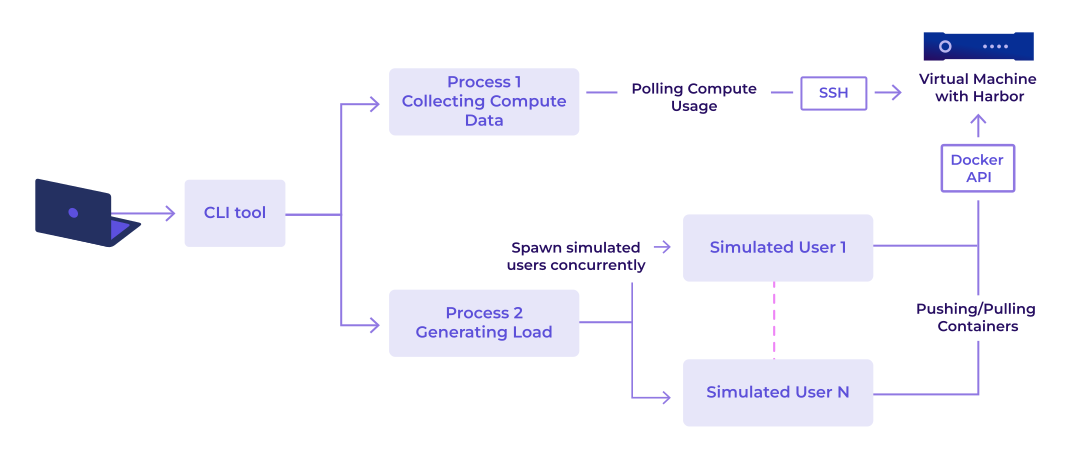
After the defined runtime had elapsed, and all push or pull operations were complete, the tool provided a summary and wrote detailed diagnostic data to multiple files. This allowed for later comparison between different runs and configurations.
All images were randomly generated to avoid Harbor’s deduplication logic from interfering with the test results. The layers were streamed from the memory directly to the network interface.
Defining scenarios
For our tests, we used four different scenarios.
Scenario 1, “Push and Pull”, was designed to mimic the real-world usage of a registry. Every simulated client independently performed an image pull or push with a probability of 75% for pulls and 25% for pushes. The size and layer count differed for each image but was centered around 250 MB with 25 layers.
Scenario 2, “Push Large”, only performed push operations with very large images with about 10 GB and 25 layers. This scenario aimed for a very high and steady load.
Scenario 3, “Push Many Layers”, (250 MB/90 layers) and scenario 4, “Push Small”, (10 MB/25 layers) simulated different kinds of images to detect different behavior that was related to the size or layer count.
Test results
In every test run after five minutes, no further new actions were started; we waited for remaining pushes and pulls to finish.
Comparing different amounts of clients
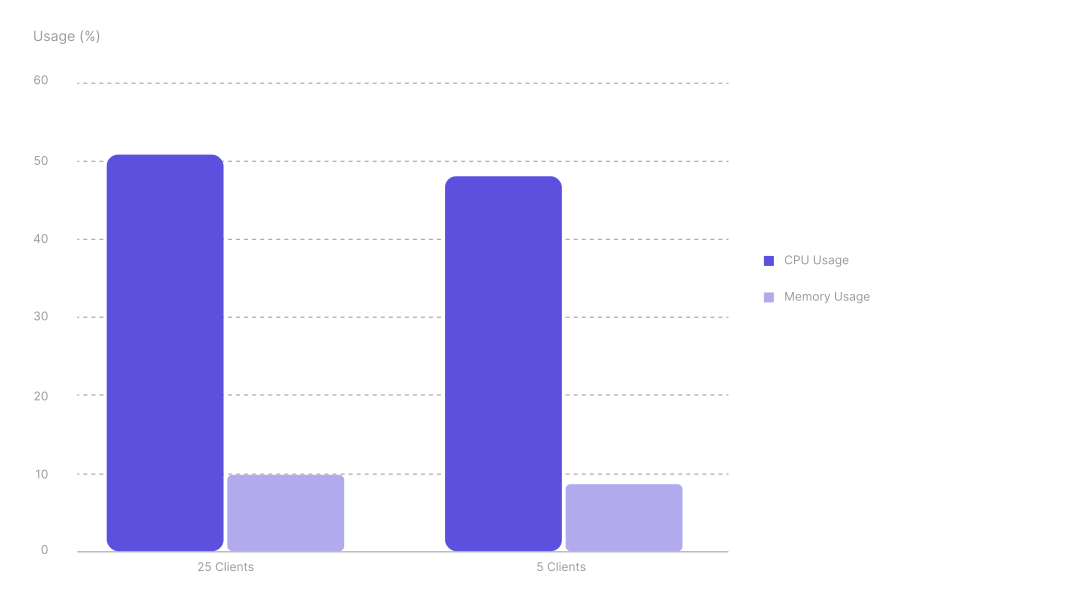
The scenario 1 (Push and Pull) is used here to achieve the most realistic workload on the registry.
Scenario 1: Push and Pull
Comparing the scenario with with 5 and 25 parallel clients showed only marginally higher average CPU and memory usage on the CPX42. A similar pattern was visible for the average network receive and transmit speeds, which also correlated with the disk read and write speeds. This suggests that the registry was already saturated with 5 clients.
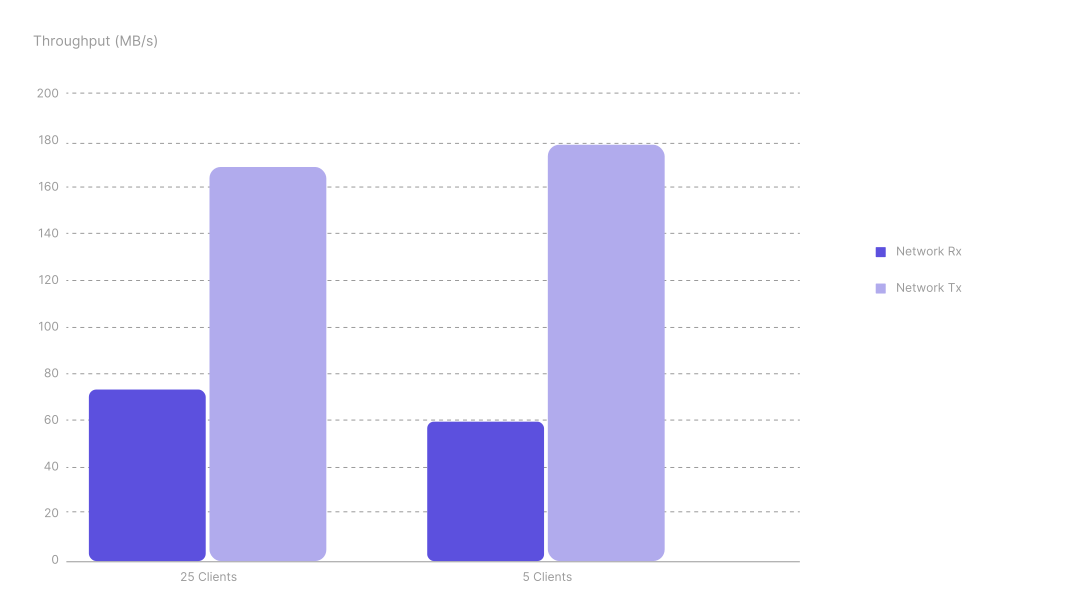
Scenario 1: Push and Pull
As the tests were performed with regular shared Hetzner Cloud Servers, the performance was expected to fluctuate due to other servers on the host machine or network stack interfering. Furthermore, Harbor itself needed some time and resources to process the incoming requests and data.
On average, pushing an image took 10 seconds with 25 concurrent clients, and 3 seconds with 5 clients. This made pushing faster with more concurrent clients in total. For pulling images, the performance correlated one-to-one to the amount of clients.
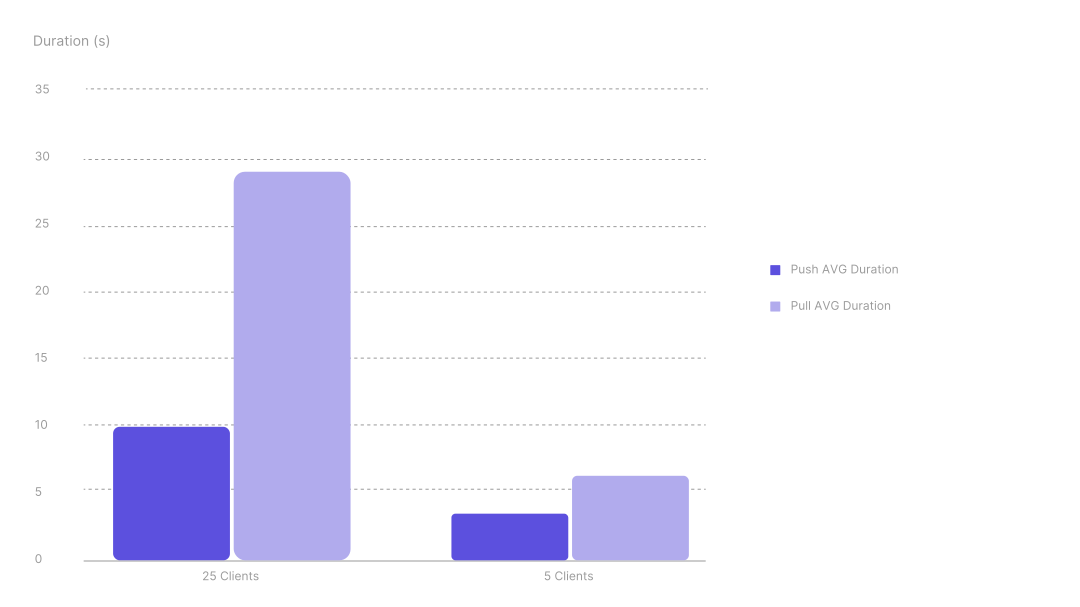
Scenario 1: Push and Pull
The same pattern appeared when looking at the client’s throughput of image data. The pull and push throughput of each client decreased with increasing concurrent clients. The fact that overall more data could be pushed in the same duration with more concurrent clients was probably related to a more balanced usage of compute and network resources. The load could be spread better across the CPU cores and idle phases of other connections could be put to use. The tests showed up to 60% more throughput with 25 clients.
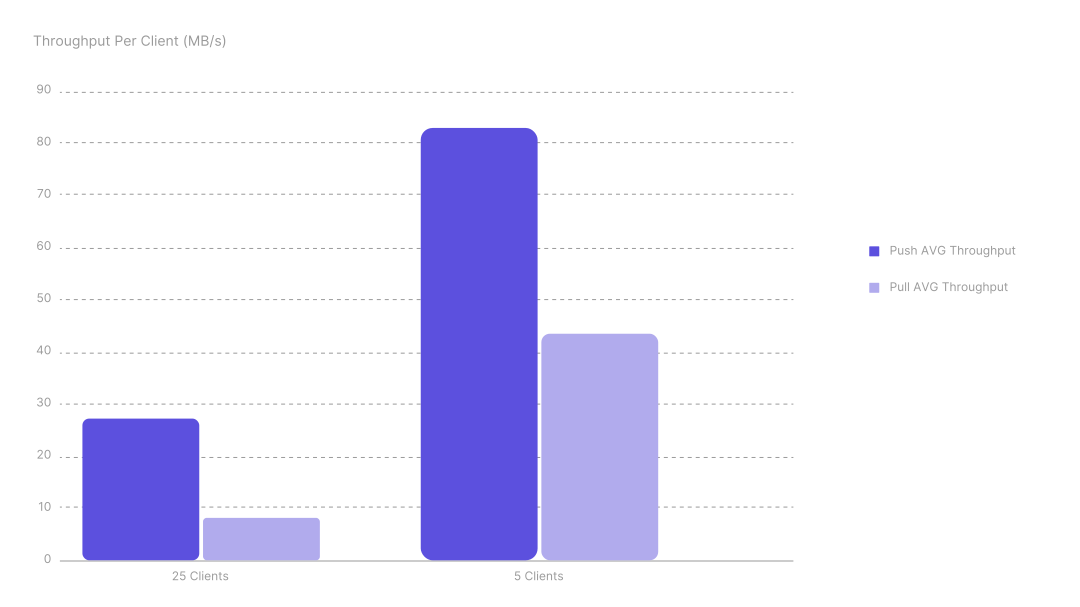
Scenario 1: Push and Pull
Comparing different scenarios
Looking at the achieved disk write peak values tells us that we were able to use the full potential of the Hetzner Cloud Volumes with around 300 MB/s in writes across different scenarios (Hetzner Cloud Volume Limits). Only in the “Push small” scenario, where our simulated clients uploaded images of around 10 MB with about 25 layers, did the processing overhead grow large enough to keep us from reaching full Cloud Volume speeds.
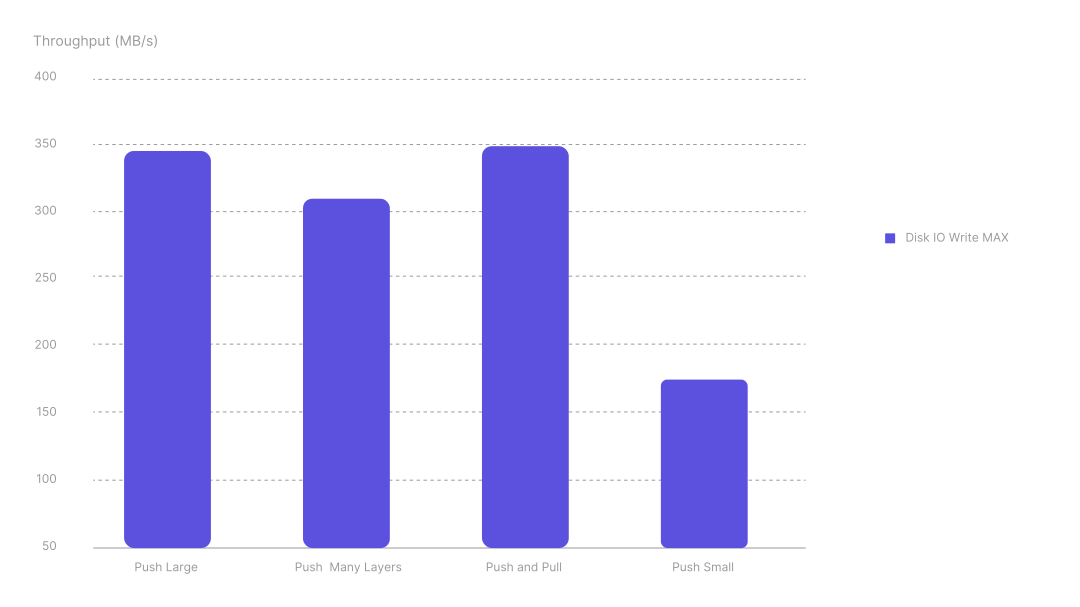
A comparison of all scenarios
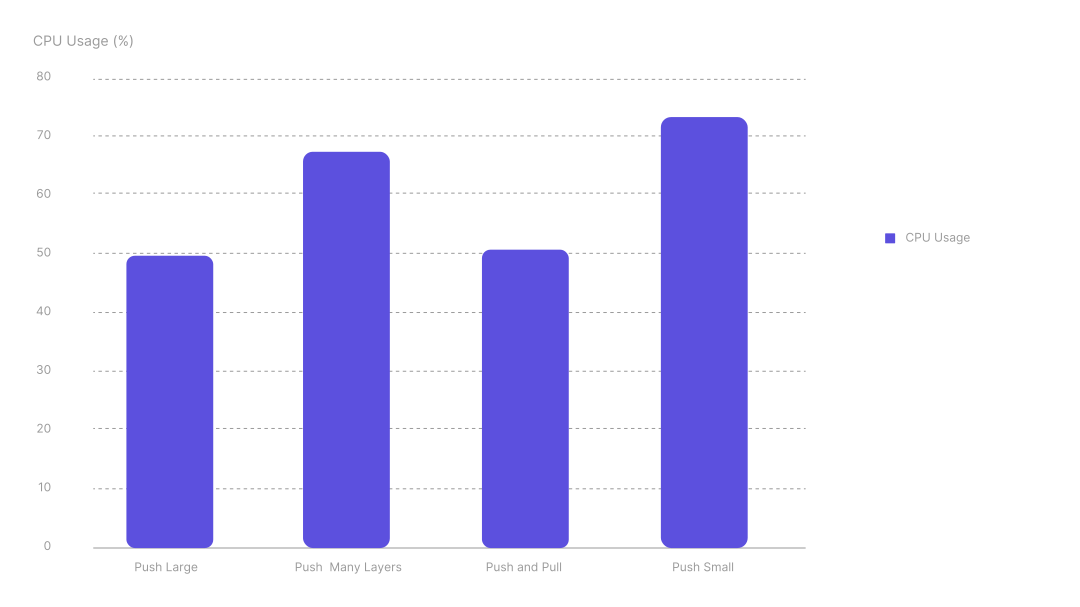
Comparing the average CPU load across the same 4 different scenarios showed that especially small images or images with many layers rely heavily on the CPU. This was probably due to the increased overhead in dealing with larger amounts of metadata for those types of images.
A comparison of all scenarios
Comparing different hardware
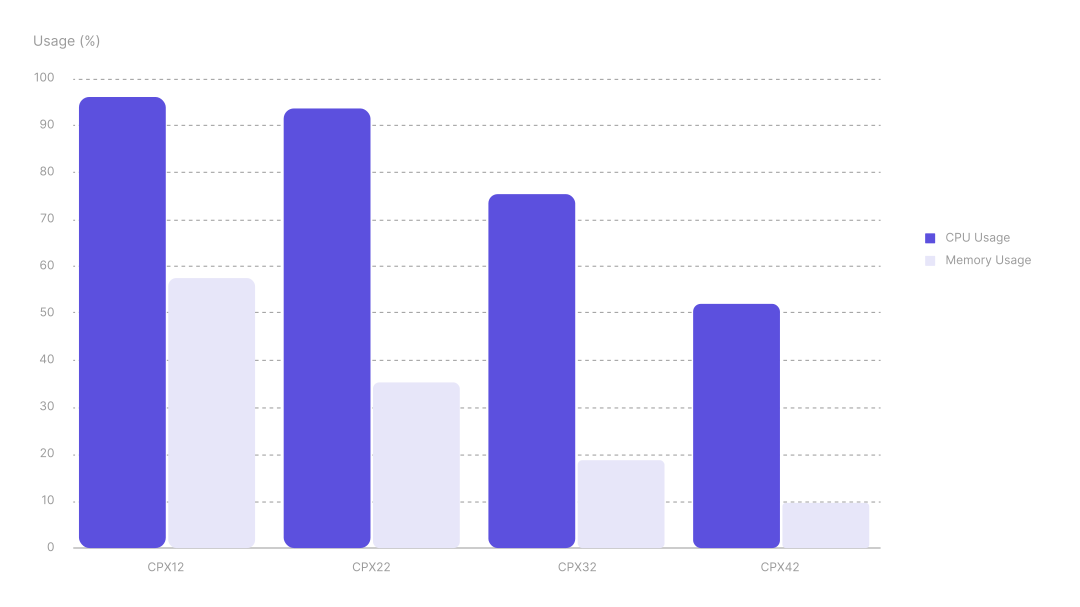
Comparing different Hetzner Cloud Server types with the push and pull scenario showed the CPU was a bottleneck for the CPX12 (1 vCPU; 2 GB RAM) and CPX22 (2 vCPUs; 4 GB RAM). While the CPX32 (4 vCPUs; 8 GB RAM) and CPX42 (8 vCPUs; 16 GB RAM) reached full CPU usage during short bursts, they stayed much lower on average. This suggests that, for those larger servers, the bottleneck was actually the Hetzner Cloud Volume write speed as the above write speed diagram confirmed that we reached the expected maximum there.
For the memory consumption, all server types stayed between 1 and 2 GB. The increased amount of memory for the larger types did not seem to have a noticeable impact on performance.
Scenario 1: Push and Pull
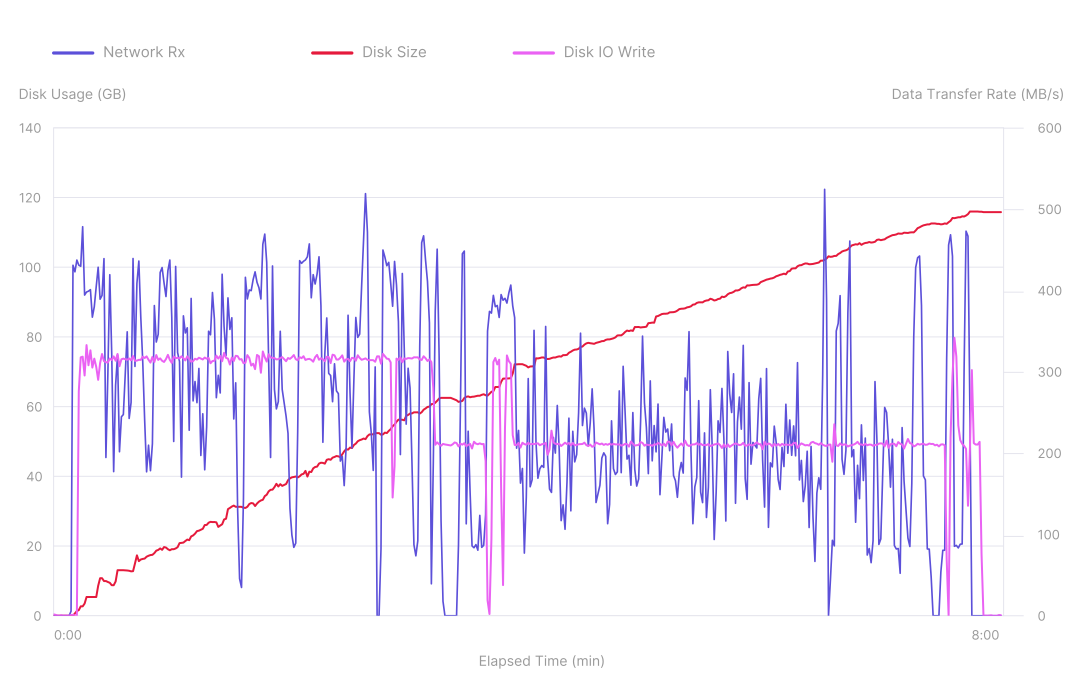
Let’s look into a single test run on the CPX42 with the scenario 2 (push large) to get a consistently high load on the registry. The disk size grew steadily with no big spikes, suggesting we were able to consistently receive image data and write it to the disk with no interruptions. After a while, the disk write speeds dropped from around 300 MB/s to 200 MB/s, which matched the expected burst and sustained write speeds. The registry used the disk to its full extent. While the network speed fluctuated a lot more, it still followed the disk speed pattern in general. That suggests that the network was not a bottleneck in this test run.
Scenario 2: Push Large
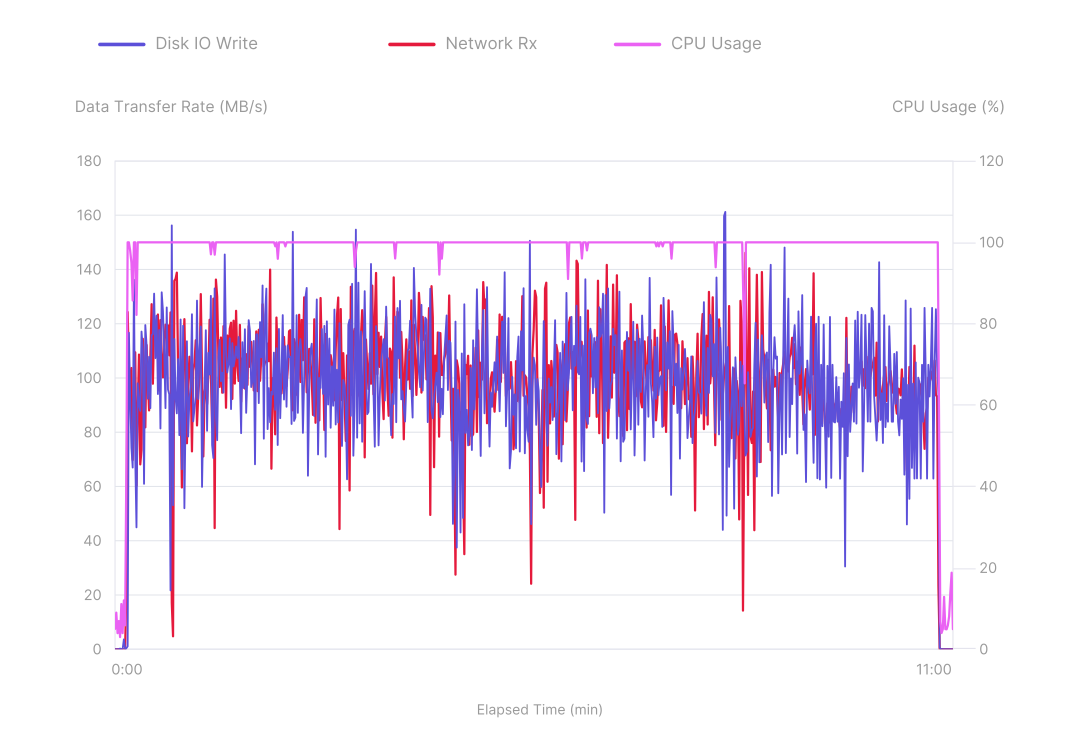
The same scenario running on a CPX12 showed a vastly different picture. The disk write and network speeds did match up as well. This was expected as we could only write data to the disks we previously had received. Both fluctuated a lot throughout the test, whereas the CPU usage hit the 100% usage ceiling consistently. This suggests the CPU was the bottleneck here.
Scenario 2: Push Large
Conclusions
The accumulated data across different configurations, as well as the single test runs, show a consistent pattern of the write speeds where the Hetzner Cloud Volumes are the most obvious bottleneck of the registry setup we created. For smaller machines with fewer than 4 cores, the CPU acted as a bottleneck as well. With smaller images or images with a lot of layers, the CPU was used more heavily and could become a limiting factor more quickly. In our tests, we can see an increased CPU usage of about 20 percentage points for those scenarios. Memory consumption did not seem to matter much and did not increase significantly under heavy load.
The registry setup was very capable of handling multiple concurrent clients pushing and pulling images; the compute resources were distributed across the open connections. There was no significant difference in compute resource usage between 5 and 25 concurrent clients in our tests. However, increasing the number of clients increased the overall throughput.
This test series confirms that the Hetzner Cloud Servers are quite capable of hosting a Harbor-based container registry. On larger servers with at least 4 cores, the first limit users run into is the write speed of the Hetzner Cloud Volumes, which settles at around 200 MB/s under sustained load.
We assume the proposed setup is sufficient for small- to medium-sized teams and projects. Especially with the broad size range of the Hetzner Cloud Volumes, it is feasible for these potential users to build a solution that fits many different use cases.
Using Hetzner Cloud Servers larger than the CPX42 might be beneficial when enabling Harbor features like vulnerability scanning. It’s also possible for users to scale beyond the Hetzner Cloud Volume limitations by using the local disks on Hetzner Cloud Servers or Harbor’s S3 interface.
