Every day, we work with domain names, type addresses into the browser, and use web services. What feels so natural has a complex technical foundation underneath. When you type “hetzner.com”, for example, you expect the website to open almost instantly. But before that happens, your device first has to find out which IP address sits behind that name. Behind this search is the DNS, the Domain Name System.
In this article, we explain what it's all about and how the DNS works technically. After that, we show you how to properly manage the domain names and IP addresses of your projects on Hetzner Console.
What is DNS?
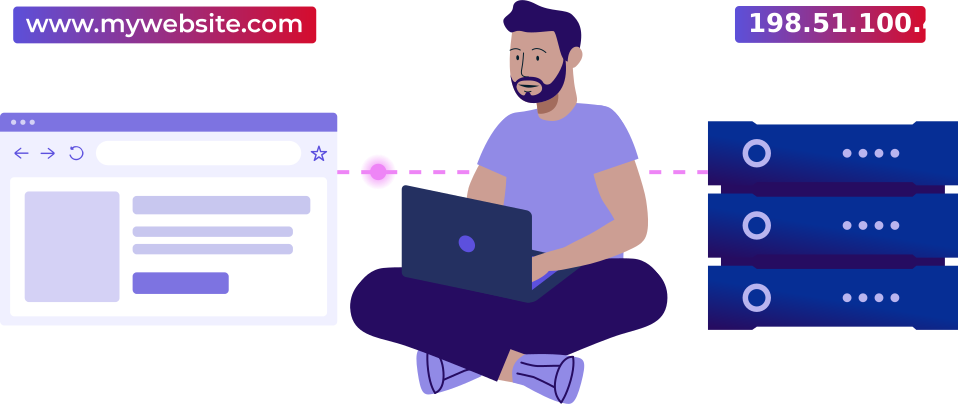
For you to open a website, your smartphone, laptop, or PC has to know which IP address belongs to the web address you typed. But in everyday use, you don't type long strings of numbers—you type a name that's easy to remember. So how does that work?
DNS makes sure a domain name gets matched to the right IP address. Think of it like a phone book: on one side you have the name, on the other the matching number. When you look up a site on the internet, it's as if someone looks up the right number in the phone book for you.
How a DNS query works
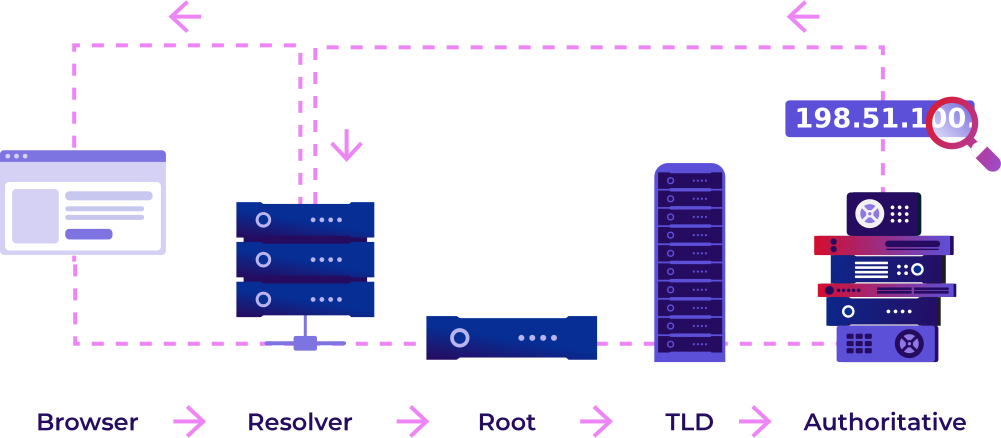
So what does your computer do when you open a page? It heads into the DNS. Let's take “www.hetzner.com” as an example. The moment you press Enter, the lookup process begins.
DNS resolver
Your browser first checks whether it already knows the corresponding address. If not, it asks the operating system. DNS responses may also be cached there. If your device still does not know the address, the query is forwarded to a DNS resolver. People say the domain name gets “resolved” into an IP address—hence the name. The resolver now takes over the search for the right IP address. Usually, your internet provider supplies it. The resolver works its way through the DNS step by step. The system is hierarchical, and you read it in the domain name from back to front.
The root level
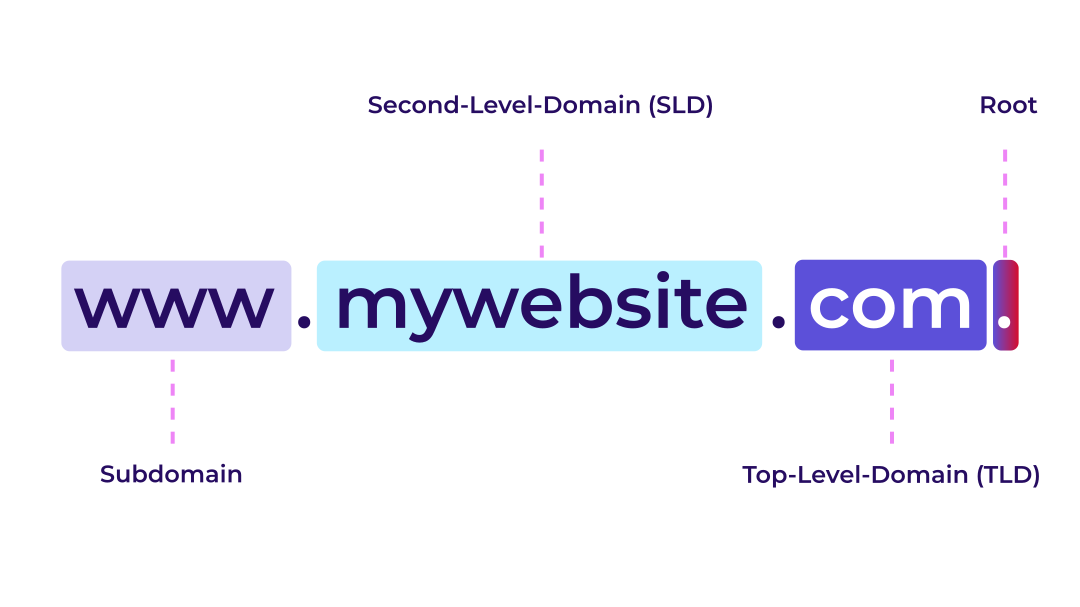
The start of the process is the root level, but it is shown by a dot at the very end of „com.“ in „hetzner.com.“. It is after the „m“ here. We don’t usually say or write the root level, but it is implied. The root servers don't know the IP address you're looking for, but they do know which servers are responsible for the next level.
Top-level domain, second-level domain, and subdomain
The ending of an address is called the top-level domain, or TLD for short. Every ending has its own TLD name servers—for .de, .com, .net, or .org, for example. The .com TLD name servers don't know the right IP address either. But they know which authoritative name servers are responsible for hetzner.com. That's where the second-level domain (SLD) comes in: the actual domain name is “hetzner”. The “www” at the front is the subdomain, or hostname. It points to a specific service within the domain—often the website.
Authoritative name servers
These servers contain the authoritative DNS information for the domain. That means they can finally give the resolver the IP address it has been looking for. With that, the search is over: your browser now knows where to send the request and builds the connection to the website.
DNS caching and TTL
So that this search doesn't start from scratch every time, there is DNS caching. Browsers and DNS resolvers store DNS answers they have already looked up for a certain time. How long an entry stays stored is set by the TTL (“time to live”). Once it expires, the entry has to be looked up again.
DNS zones and DNS records
Before you manage domains, it's worth taking a look at DNS zones and records. This is exactly where you define where a domain points and which services are connected to it. The data a name server returns is called DNS entries, DNS records, or resource records. They live in DNS zones. A DNS zone is a manageable area within the DNS, and it usually corresponds to one domain.
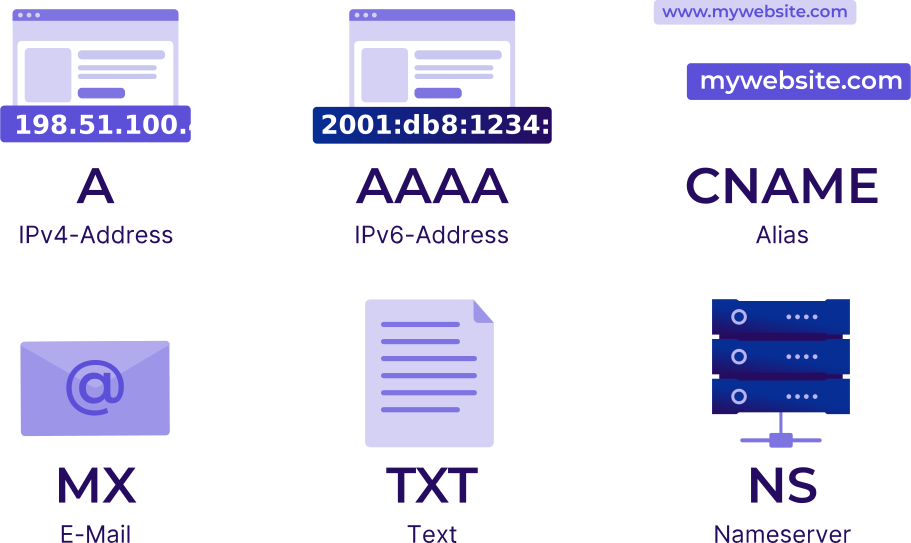
Every record has a specific type. This record type defines what kind of information is stored. The most important record types are the following:
A – points a domain or subdomain to an IPv4 address, for example 192.0.2.0
AAAA – points a domain or subdomain to an IPv6 address, for example 2001:db8:ffff:ffff:ffff:ffff:ffff:ffff
CNAME – sets an alias for another domain name. Example: www.hetzner.com points to hetzner.com. The actual IP address is then resolved through the target name
MX – defines which mail servers are responsible for email sent to a domain. Example: for hetzner.com, an MX record could point to mail.hetzner.com
TXT – stores text information in the DNS. TXT records are used mainly for domain verification and for email security mechanisms such as SPF, DKIM, or DMARC
NS – defines which name servers are responsible for a domain or zone
There are many more types. You'll find a complete overview in our docs.
Another term you may come across in DNS management is the RRset, short for Resource Record Set. It refers to a group of records with the same name and type. Several A records for “www.example.com” that point to different IPv4 addresses together form an RRset.
In practice: how to manage DNS records at Hetzner
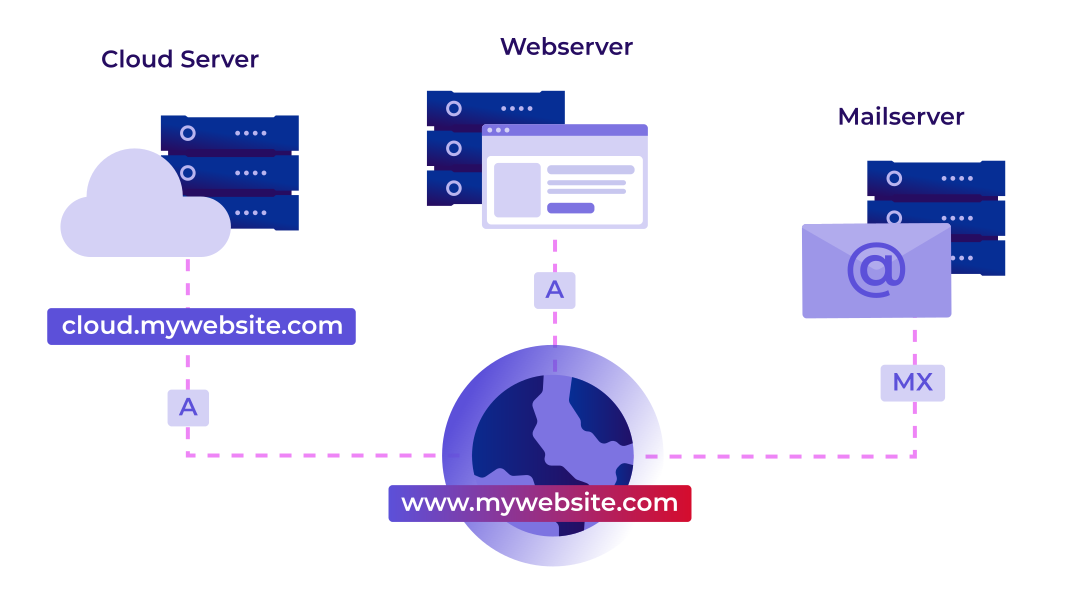
Now you can connect domains and subdomains to the right services. That could be, for example:
- your website,
- your mail server,
- your cloud server,
- or an external service.
They all need the right DNS records so that requests end up in the right place. It doesn't matter whether you bought your domain or your server at Hetzner. For DNS management, all you need is a Hetzner Console account. You can manage DNS zones there for free and create, edit, or delete records. If your domain is with another provider, just add one important step: you have to switch the name servers there to Hetzner. Only then is Hetzner responsible for your domain's DNS zone. After that, you can manage your DNS records conveniently on Hetzner Console.
Website, email, and a private cloud: what you need for management
Domain
The first step is your own domain if you don't have one yet. Domain names are registered through what are called registrars. Many providers, Hetzner among them, handle this registration for you. This secures your right to use a domain name for a set period—usually for an annual fee. Important: a domain on its own is not a website yet. At first, it's just the name. Only through DNS do you define which services this name is connected to.
Website and email
Next, you need a place to store your website. In our example, you use a web hosting package from Hetzner, where you'll later install WordPress and run your site. One advantage of Hetzner’s web hosting packages is that they include email features. This means you can not only run your website, but also set up custom email addresses like info@yourdomain.com. You don't need your own mail server for this, but your domain does need the correct MX record so that emails are delivered to the right mail server.
Cloud server
For your personal cloud, we recommend the open-source software Nextcloud. For that, you rent an additional small cloud server at Hetzner.
Now all that's left is to connect everything: the domain should lead to the website, emails should land at the right mail server, and your cloud should be reachable through its own subdomain. That's exactly what DNS management is for.
Hetzner Console
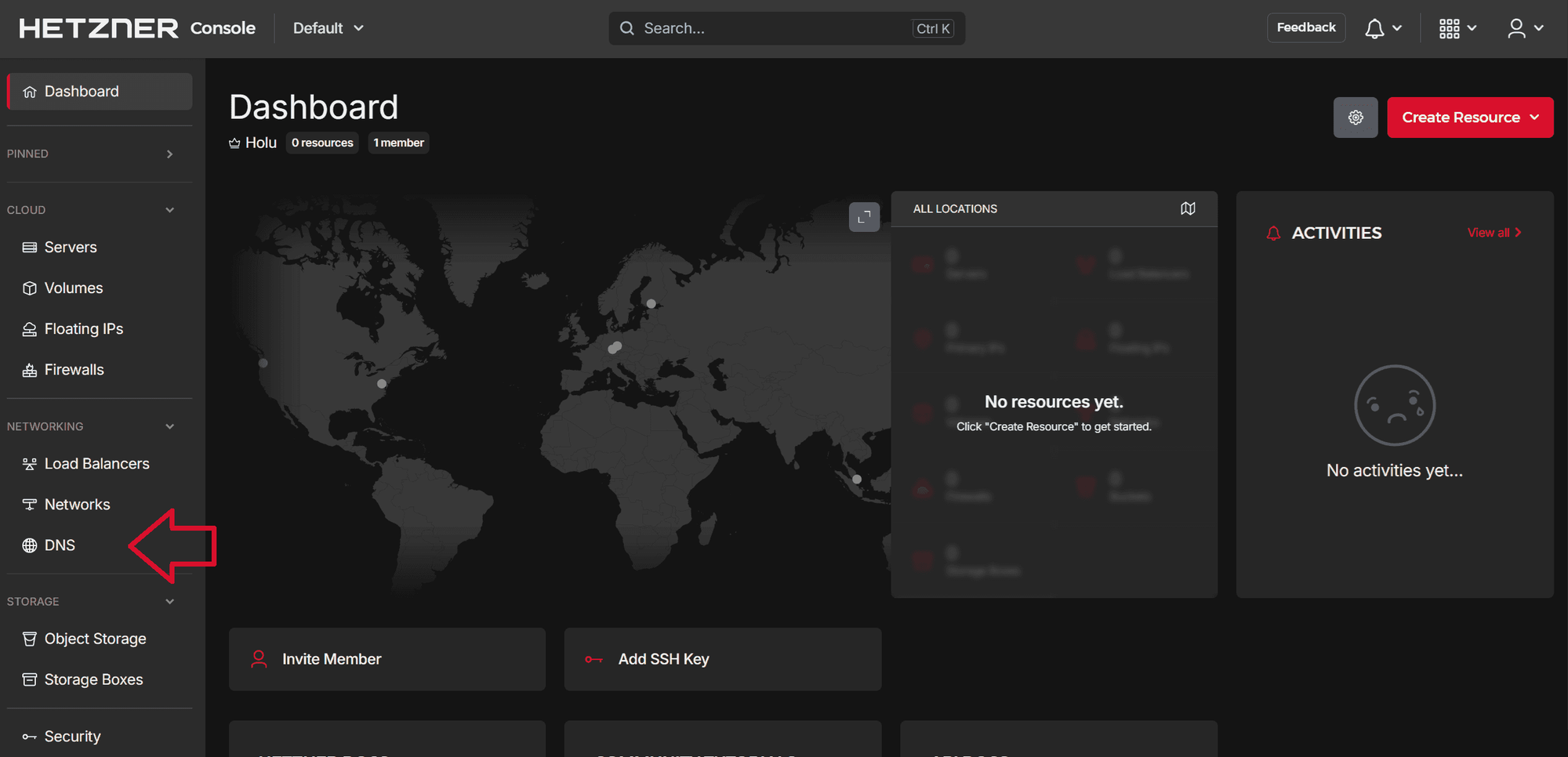
DNS management runs on Hetzner Console. First, you create a project there, then open the DNS section in the left-hand menu. Then you create a new DNS zone for your domain and then add the right records. You'll find the individual steps in our docs.
Once everything is set up, Hetzner Console shows you an overview of your DNS zone and its records. At any time, you can go here to check which entries exist, to add new records, or to adjust existing ones.
And with that, your domain is ready: website, email, and cloud server are cleanly connected through DNS. When someone visits your site or sends an email to your domain, the request ends up exactly where it should.
Common mistakes in DNS management
When you manage DNS records for the first time, all those fields may feel unfamiliar. That's normal. The most common pitfalls are easy to avoid.
DNS changes take time. Changes aren't always visible everywhere right away. That's due to DNS caching. The TTL defines how long a DNS record may be cached. Changes are often visible after a few minutes or hours, but in some cases, it can take up to 48 hours. Some resolvers or providers set their own minimum values, so even with a low TTL, it may take longer until a change is visible everywhere. You can use online DNS lookup tools to check which DNS records various resolvers are already returning and whether your changes are already visible.
Wrong name servers. If you manage your DNS zone at Hetzner, your domain's name servers also have to point to Hetzner. Otherwise, your entries on Hetzner Console won't be used.
Wrong IP address in the A record. The A record has to point to the correct IPv4 address. A single transposed digit is enough to send your domain to the wrong server.
Forgetting IPv6. If your service has an IPv6 address, you also need an AAAA record. Otherwise, your domain is only reachable over IPv4.
Using CNAME incorrectly. A CNAME points to another name, not to an IP address. It's also mainly suited for subdomains, not for the main domain. And remember to include the dot at the end of the target value.
Conclusion: easy management on Hetzner Console
At first glance, DNS looks complicated: root servers, name servers, records, zones, TTL—a lot of terms pile up quickly. But once you understand the basic principles, much of it gets a lot easier. At its core, it comes down to just one thing: connecting names to the right services.
Hetzner Console helps you keep an overview. It shows you your DNS records and domains clearly, all in one place and for free. Just give it a try: create your first project, set up a DNS zone, and add your first record.